Conversation Intelligence
Dashboard and teams
Start from the dashboard, then go from a team to an agent to a single call.
The dashboard shows how calls are going and what needs attention. From there, you can go as deep as you need.
The dashboard
The Dashboard has 3 tabs:
- Overview: results, plus what needs attention.
- Skills: how each skill is doing across calls.
- Contact reasons: why customers are calling.
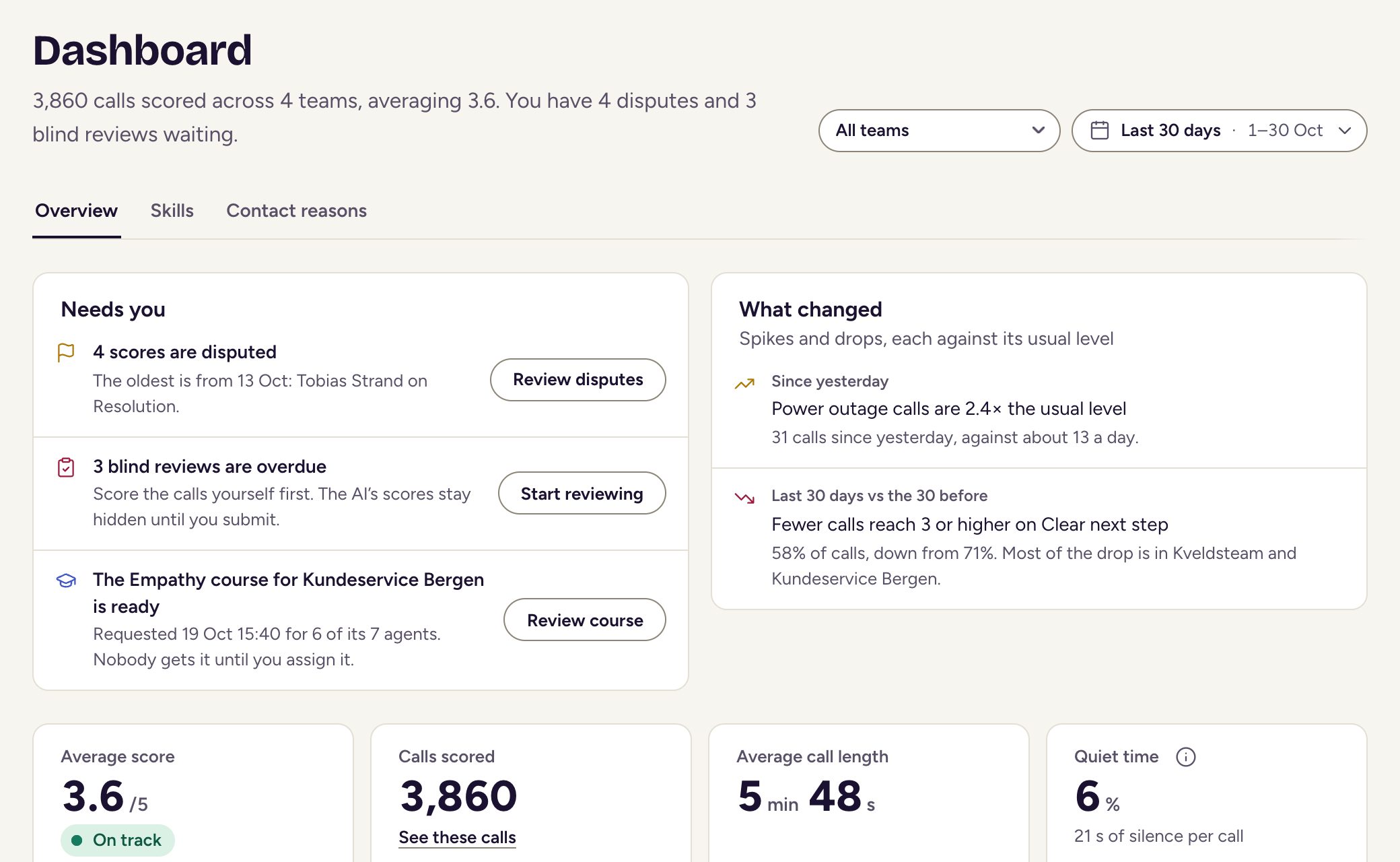
On Overview, these 2 cards tell you where to look first:
- Needs you appears when work is waiting for you, such as disputes, blind reviews and courses that are ready.
- What changed points out call-volume spikes and skill drops compared with your usual level.
From team to agent to call
- Open a team from the dashboard’s Teams section.
- Choose an agent to see their skills compared with the team.
- Open the Calls tab and pick a call to read it with its evidence.
Comparing teams
On the Teams page, choose Compare teams to put 2 or more teams side by side. Sort by Biggest gap first to see where they differ most.
Calls and agents
The Calls list lets you find the calls you have access to and export them. The Agents list shows everyone being scored.
Clients see the Overview and Contact reasons tabs and calls, but not Needs you. Teams and agents are for managers and admins.