Exams and progress
Take certification exams and follow your progress with XP, streaks and the leaderboard.
Exams show what you can do. XP and streaks help you keep going.
Certification exams
Your exams are on the Journeys page, under Exams. Open one and choose Go to the exam call, then Start the call once the sound check can hear you.
If you haven’t passed and have attempts left, you can start a new one. Your team lead sees the result.
- Practice calls first. Some exams start with practice calls. They don’t count and don’t use attempts, so do as many as you like. Tips are off, as in the exam.
- Dates. The exam call is open between two dates, shown on the exam page. Before it opens it is locked, but you can practise. After it closes you can’t start it. Talk to your team lead if you still need it.
- Attempts. An attempt counts from the moment you start the call, not when you finish. There are no tips and no pause.
- If the call drops. A cut-off call doesn’t count, and you usually get the attempt back. We check how it ended, which can take a few minutes. The exam stays locked until then, and the page updates by itself.
- When you finish. End the call and it is submitted. You don’t need to keep the page open. If you are out of attempts, your team lead can reset them.
You get a notification when the exam is finished, because you passed or used your last attempt. It comes in the app, and by email if email is on for Feedback and results. See notifications and settings.
XP, levels and streaks
You earn XP by practising. On Home you can follow your level, your weekly goal and your streak. Once you have started a journey, Your coach’s pick suggests your next call.
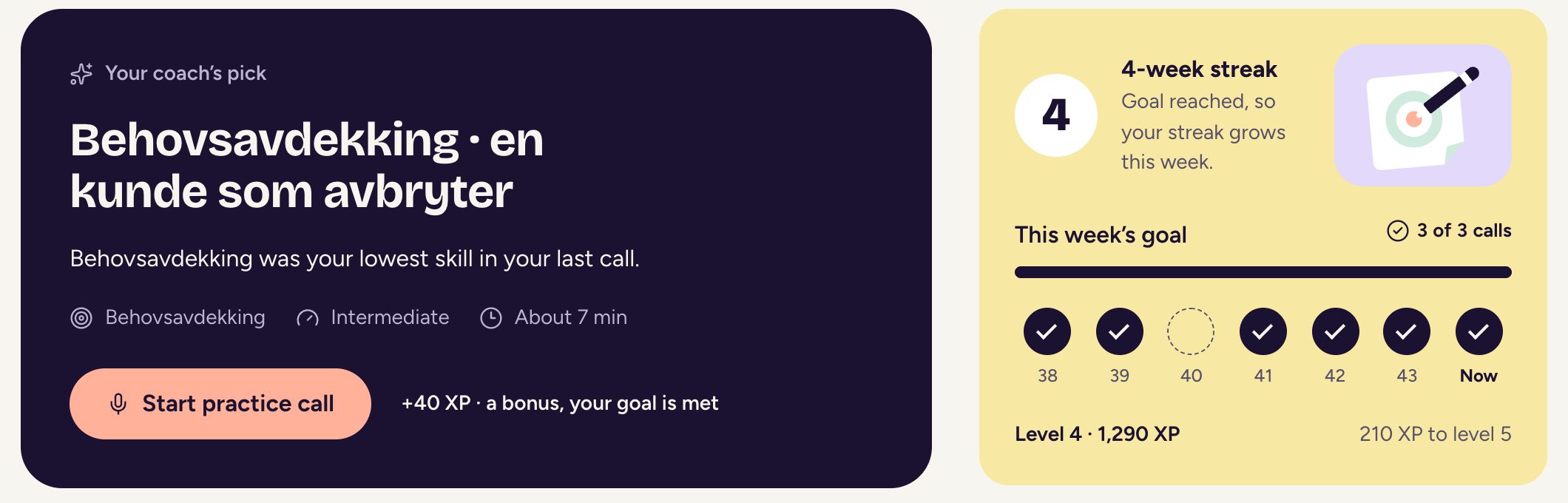
- Weekly goal. Your team lead sets how many practice calls you aim for from Monday to Sunday. If the goal changes, Home shows the new goal and when it starts.
- Streak. Each week you reach your goal adds a week to your streak.
- Freeze. A freeze covers one missed week, so your streak survives. Keep reaching your goal to earn another.
- XP. Harder calls earn more. You also earn XP for reaching your goal, a new personal best on a skill and passing an exam. How XP works, under Me, lists it all.
Leaderboard
The Leaderboard ranks people by XP, never by their scores. Open it from Home or from Me, and choose This week or Last 30 days. You also see how the teams compare. It starts again every Monday.
People near the bottom are listed without a rank number, so nobody comes last. Your team sees names and XP. Your calls and your goal show only to you.
Your organisation admin can switch the leaderboard off. Your XP, streak and weekly goal still count on Home.
Updated